Set the decision problem
Choose the market, objective, benchmark, eligible instruments, constraints, dates, and evidence students must submit.
Course brief + rubricBring portfolio simulation into your finance course: students research markets, form an investment thesis, manage virtual portfolios, design trading rules, and test ideas. Instructors organize classes or cohorts, set up a stock market game for students, and review the evidence behind each decision.
Choose the course family closest to your syllabus. Each guide maps recognizable course titles to learning outcomes, platform capabilities, and assignment ideas.
Use a stock portfolio simulator to move from screening and investment theses to virtual positions and reviewable portfolio decisions.
Investments · Equity Analysis · Financial MarketsRun a portfolio management simulation and asset allocation simulation across independent virtual portfolios, rebalancing, and constraints.
Portfolio Management · Asset Allocation · Investment LabExplore user-defined structures, hedges, payoff decisions, and instrument-aware simulation.
Derivatives · Options Markets · Futures MarketsBuild reproducible rules, challenge overfitting, and compare backtests with virtual forward tests.
Algorithmic Trading · Systematic Trading · Technical AnalysisTranslate quantitative models into bounded, inspectable portfolio and strategy experiments.
Financial Engineering · Quantitative Finance · OptimizationConnect data preparation and code to indicators, signals, strategies, APIs, and portfolio outcomes.
FinTech · Python for Finance · Financial Data ScienceUse a risk management simulation to make policies explicit and compare discretionary choices with rules-based decisions.
Financial Risk · Behavioral Finance · International MarketsAn investment simulator for students that turns diversification, policy, and long-horizon investing into observable decisions.
Personal Finance · Individual Investing · Wealth ManagementA ranked Trading Challenge can add the energy of a stock market game, but ranking is optional. Portfolio, Strategy, and custom labs can focus instead on process, constraints, evidence, and reflection.
Organizing a competition outside a classroom? Run a private stock market game for your investment group.
Choose the market, objective, benchmark, eligible instruments, constraints, dates, and evidence students must submit.
Course brief + rubricScreen securities, examine charts or fundamentals, build a virtual portfolio, or express the thesis as visual or Python rules.
Criteria + thesis + positionsReview hypothetical backtests, orders, holdings, trade history, portfolio behavior, and virtual forward results.
Rules + trades + outcomesEvaluate assumptions, distinguish process from performance, identify limitations, and document how evidence changed the decision.
Memo + critique + revisionInstructor accounts are free. Students join the classroom before checkout, so Investfly can offer the academic Premium rate and enroll upgraded or institution-sponsored students in open Labs automatically.
Create classes, invite students, configure labs, provision managed portfolios automatically, review progress and portfolio outcomes, and export class summaries.
After joining a classroom, students see one academic Premium upgrade. Checkout unlocks automatic enrollment and managed portfolios for every open Lab.
Institutions can sponsor student Lab access instead of requiring individual subscriptions. Sponsored students are treated as ready for automatic Lab enrollment.
Contact sales@investfly.com to discuss an institution-funded program.Create the instructor account. No payment method is required for faculty access.
Students join the classroom. Their student role and academic upgrade become available immediately.
Upgrade or sponsor access. Investfly then enrolls the student and provisions every open Lab portfolio automatically.
Create the class yourself, invite students, and begin managing the cohort from the Instructor Dashboard—without a sales call or implementation project.
Send tracked invitations from the classroom dashboard, or copy a complete invitation email with private join instructions for your normal course communications.
Register as an instructor. The account is free and requires no sales call.
Free instructorEmail from the dashboard or share the class invitation link externally.
Invite sentStudents open the invitation and create a student account or sign in.
Student accountStudents accept the invitation to join the instructor's class or cohort.
EnrolledUse the dashboard to create labs, monitor automatic portfolio provisioning, review progress, and export summaries.
Class activeKeep course administration separate from student experimentation. Create a class once, then use Portfolio, Strategy, Trading Challenge, or custom labs to set the permitted activity. Active students are enrolled and receive dedicated lab portfolios automatically.
Explore as an instructor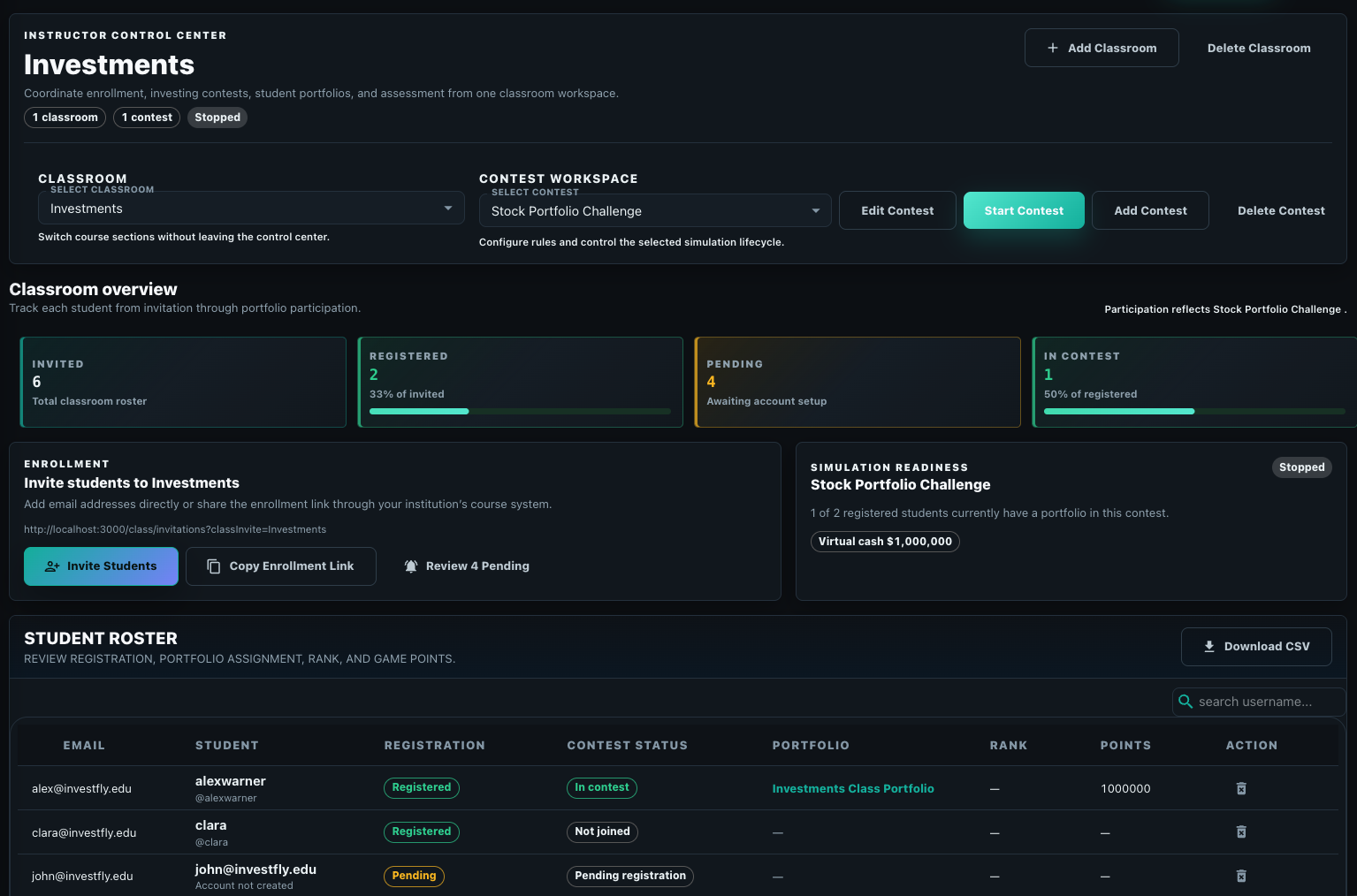
Every student does not need the same technical path. Select the environment that matches your prerequisites, learning objectives, and available class time.
Best for introductory investments, security analysis, portfolio management, personal finance, and behavioral finance.
Best for systematic investing, technical analysis, derivatives rules, risk controls, and an introduction to algorithmic trading.
Best for quantitative finance, financial engineering, FinTech, data science, econometrics, and advanced algorithmic trading.
These paths can be used independently. A course can stay entirely with manual virtual portfolios; programming and automated strategies are optional.
Stock market simulation is the clearest starting point for many finance classes. Use the same research, strategy, and portfolio vocabulary across supported asset classes while keeping instrument scope and permissions under instructor control.
Security analysis, screening, allocation, diversification, rebalancing, factor discussions, and portfolio policy.
Contract selection, multi-leg structures, hedging, payoff logic, DTE and strike rules, exits, and lifecycle discussion.
Contract mechanics, ticks, directional rules, session timing, expiration-aware controls, and risk scenarios.
Currency pairs, pips, macro or technical theses, directional rules, and market-session timing.
Digital-asset research, supported spot pairs, scheduled accumulation, basket allocation, and rebalancing exercises.
Asset, market-data, order, backtest, and account availability varies by instrument, provider, entitlement, jurisdiction, plan, and current platform support. Fixed income, real estate, commodities, and ESG topics may use listed securities or ETFs where appropriate; Investfly is not a bond-pricing, property-modeling, or institutional research terminal.
Use these facts for course planning and initial departmental review. They state what the current academic experience does—and what it does not claim to replace.
Students receive the class invitation, create an account or sign in, accept the invitation, and join the class. Investfly accounts require users to be at least 18 years old.
Investfly provides market, portfolio, strategy, simulation, and class-management tools. It does not claim native LMS or gradebook integration and is not the institution's academic system of record.
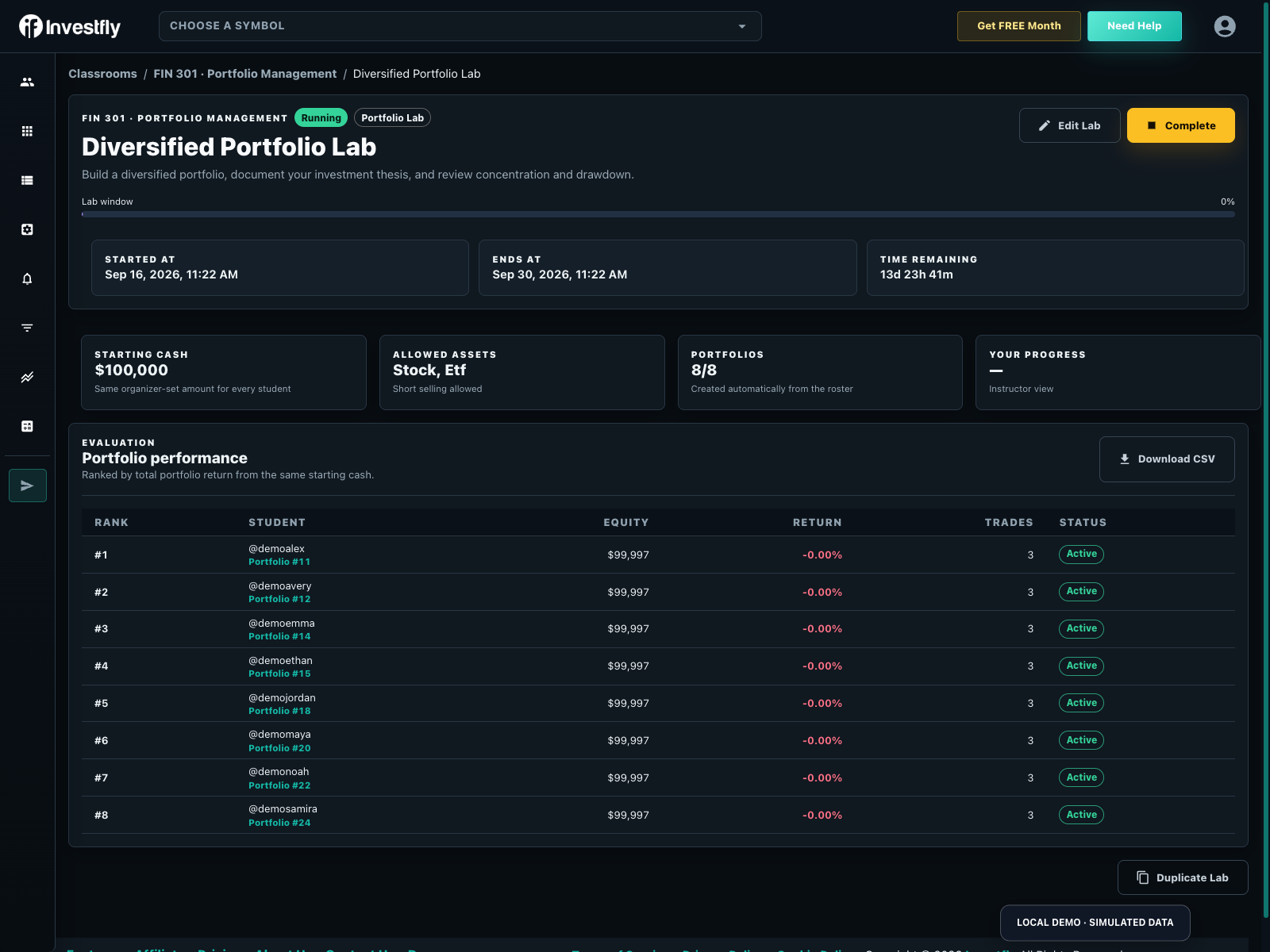
Review enrollment readiness, dedicated lab portfolios, activity, optional return rankings, and supported CSV results in the Instructor Dashboard, then use those artifacts with your normal rubric and gradebook.
Investfly publishes its Terms of Service and Privacy Policy, including account, content, usage, retention, safeguard, and deletion information. No unlisted certification or compliance claim is implied.
Students can use the $29 monthly Student Premium plan, while institutions may sponsor Lab access. Instructor accounts remain free; contact Investfly to discuss an institution-funded program.
Students may cancel after the course or retain the same academic rate indefinitely. Users should export content they need to retain; questions can be sent to support@investfly.com.
Investfly is designed first for university finance programs. The same instructor-managed environment also supports serious trading schools, coaching businesses, bootcamps, and professional workshops teaching market research, portfolio construction, risk, or automated trading.
Create FREE instructor accountCreate an instructor-managed class, invite learners, and keep each intake organized in its own workspace.
Move from market research and discretionary decisions to explicit rules, visual strategies, or supported Python work.
Use virtual portfolios, historical backtests, and forward simulation without requiring learner capital.
Inspect participation, portfolio outcomes, trade histories, and exportable summaries for focused coaching feedback.
Investfly supplies the simulation lab and instructor controls. Your organization owns its curriculum, coaching, learner support, and claims about outcomes.
Course fit, student work, pricing, onboarding, instructor controls, markets, and institutional planning are covered above. These are the remaining questions instructors commonly use to set expectations.
No. Manual virtual portfolios and the visual strategy builder do not require Python. Use the Python SDK only for courses where programming is an intended learning outcome.
Yes. The Trading Challenge template supports a total-return leaderboard, but competition is optional. Portfolio, Strategy, and custom labs can remain unranked and emphasize research evidence, rule design, backtests, forward observation, memos, and reflection.
Current controls include manual or submitted-strategy operation, allowed asset types, equal starting cash, dates, short-selling policy, total-return or unranked evaluation, and class-result visibility. The portfolio UI exposes only supported actions while the backend enforces the same rules.
No. Students join the classroom once. Creating a Lab enrolls upgraded and institution-sponsored students and prepares a dedicated portfolio for each account. Students who join later are added to open Labs after they upgrade or receive sponsored access. Strategy Labs still require each student to choose a strategy submission.
No. Backtests are hypothetical and virtual portfolios are simulations. They do not represent actual trading or predict future results. Data, instruments, fills, and other assumptions can differ from real markets.
State that simulations are hypothetical and that available instruments, data, fills, packages, strategy features, and account behavior depend on current support. Course pages identify discipline-specific boundaries such as omitted taxes, unrestricted model training, or full fixed-income analytics.
Yes. Private educators can organize learners into instructor-managed cohorts for research, virtual portfolio practice, strategy building, backtesting, and forward simulation. The training organization remains responsible for curriculum, learner support, and outcome claims.
| Decision | Delivered workflow |
|---|---|
| Instructor access | Free instructor account; create the classroom and roster. |
| Learner access | Students join first; academic Premium is $29/month or eligible institution-sponsored access. |
| Launch | Confirm active roster, learner eligibility, managed portfolios, allowed assets and visibility before starting. |
| Evidence | Review progress and available CSV exports; retain thesis/reflection grading in the LMS. |
Download the printable Investment thesis and sizing assignment. It contains an explicit task, fictional worked illustration, rubric and local note fields.
For individual retail practice, use the virtual portfolio simulator. For a group contest, see private trading Challenges. Check current learner access before promising participation.
Download a sample instructor CSV. It uses the current export columns: rank, username, strategy, portfolio ID, equity, return %, trades and status. Two invented learners start with $100,000; $101,250 is +1.25% and $99,750 is −0.25%. These are fictional values, not student data or actual trading results.
Create a free instructor account, run your first class at no cost, and decide later whether learners or your institution will fund continued access.
Available data, instruments, strategy features, and class controls depend on current product and academic plan support.