Use the SDK as the authoring contract
The public investfly-sdk package provides typed strategy, market-data, portfolio, order, and indicator models plus an interactive CLI. Your code declares its universe, callbacks, configuration, and requested orders; Investfly supplies the supported hosted runtime and account services.
Start with the current Investfly Python API documentation. It is generated from the SDK and is the source for current signatures, models, command examples, and package requirements.
1. Install the SDK and copy samples
- Install Python 3.11 or later and create a virtual environment for the project.
- Install the current
investfly-sdkpackage. - Start
investfly-cli, review its help, and usecopysamplesto create a local sample directory. - Open the copied strategies in your IDE and trace the SDK types before changing the logic.
The SDK quickstart contains the exact current commands.
2. Define a strategy class
Subclass the SDK TradingStrategy interface. Define the security universe and add a market-data callback, one or more scheduled callbacks, or both. Read market and portfolio state through the injected services, and return only the orders your logic requests.
Keep each decision explicit: instruments, trigger timing, direction, size, order behavior, exits, and state. Hosted code runs inside a restricted environment with supported imports and runtime limits; do not assume an arbitrary package, network call, filesystem path, or unrestricted process is available.
3. Validate locally
- Type-check the strategy and copied examples with the current command from the SDK quickstart.
- Exercise small pure calculations locally where possible.
- Confirm callback names, decorators, return types, symbols, intervals, schedules, and SDK imports.
- Remove embedded passwords, tokens, private keys, and environment-specific file paths before upload.
A successful local import or type check validates the authoring surface; it does not reproduce hosted market data, account state, order validation, or fills.
4. Upload and inspect the saved strategy
Sign in through investfly-cli and use the current strategy create or update command with the Python file. The CLI uses the strategy class name as the Investfly strategy name. Then open Strategies in the web application and inspect the uploaded code and saved definition before testing it.
When you update the file, upload the new version and repeat the relevant backtest and deployment checks. Do not assume an existing deployment automatically represents the behavior you intended after an edit.
5. Backtest and run in simulation
Use the strategy Backtest tab to replay the uploaded code against available historical data. Inspect the trade list, portfolio path, warnings, and multiple periods using How to Backtest a Trading Strategy.
Next, deploy to a compatible Investfly virtual portfolio and observe current callbacks, orders, positions, schedules, and errors with simulated funds. Backtests and paper trading have different timing and fill assumptions, and neither predicts live results.
6. Authorize an eligible account only when ready
For live use, connect an eligible provider account, choose it from the strategy Deployment tab, review compatibility and live-trading terms, then authorize deployment yourself. Supported instruments, data, packages, account features, permissions, jurisdiction, and provider behavior determine what can run.
See the Python algorithmic trading platform page for supported product capabilities and the trading bot management guide for ongoing monitoring.
Complete Python tutorial: install, check and upload
This example uses the public investfly-sdk 3.1.2 release and Python 3.11+. Save MyStrategy.py in a local project folder. The strategy declares a universe, callback and managed exits; it is not a recommended allocation or market signal.
python3 -m venv venv
# macOS/Linux: source venv/bin/activate
# Windows PowerShell: .\venv\Scripts\Activate.ps1
python -m pip install investfly-sdk==3.1.2
python -m mypy --check-untyped-defs MyStrategy.py
investfly-cli
from typing import List, Optional
from investfly.models import *
class MyStrategy(TradingStrategy):
def getSecurityUniverseSelector(self) -> SecurityUniverseSelector:
return SecurityUniverseSelector.fromSymbols(SecurityType.STOCK, ["AAPL", "MSFT"])
def getStrategyPolicy(self) -> CustomStrategyPolicy:
return CustomStrategyPolicy(
assetType=SecurityType.STOCK,
positionManagement=PositionManagementRules(
positionExits=ExitRules(
protectiveExits=buildProtectiveExitPlan(
targetProfitPct=10.0,
stopLossPct=5.0,
trailingStopPct=2.0,
)
)
),
portfolioLimits=PortfolioLimits(maxOpenPositions=5),
)
@data_trigger(type=DataType.BARS, barInterval=BarInterval.FIFTEEN_MINUTE)
def onMarketData(self, updatedSecurities: List[Security]) -> Optional[List[TradeOrder]]:
execution = OpenExecutionSettings(
positionSize=PositionSizeSpec(PositionSizeMode.PERCENT_OF_EQUITY, 15.0),
orderSpec=OrderSpec(),
instrumentSelection=DirectInstrumentSelection(),
)
return self.services.planAllocationOrders(AllocationPlan(updatedSecurities, execution)) or None
The mypy check should report success when the file matches the current SDK contracts. Then enter the following commands at the investfly-cli prompt, replacing placeholders locally. Do not paste credentials into a shared source file.
login -u YOUR_USERNAME -p YOUR_PASSWORD
strategy.create -f MyStrategy.py
strategy.backtest.start -i YOUR_STRATEGY_ID
strategy.backtest.result -i YOUR_STRATEGY_ID
logout
exit
Create returns the saved strategy identifier; substitute that identifier in the backtest commands. A completed result includes status, matched trades and performance; a zero-trade result is possible and is not a failed installation. Review the reported history and warnings. These commands create and test a strategy in your account when you run them; they do not connect or deploy a live brokerage strategy.
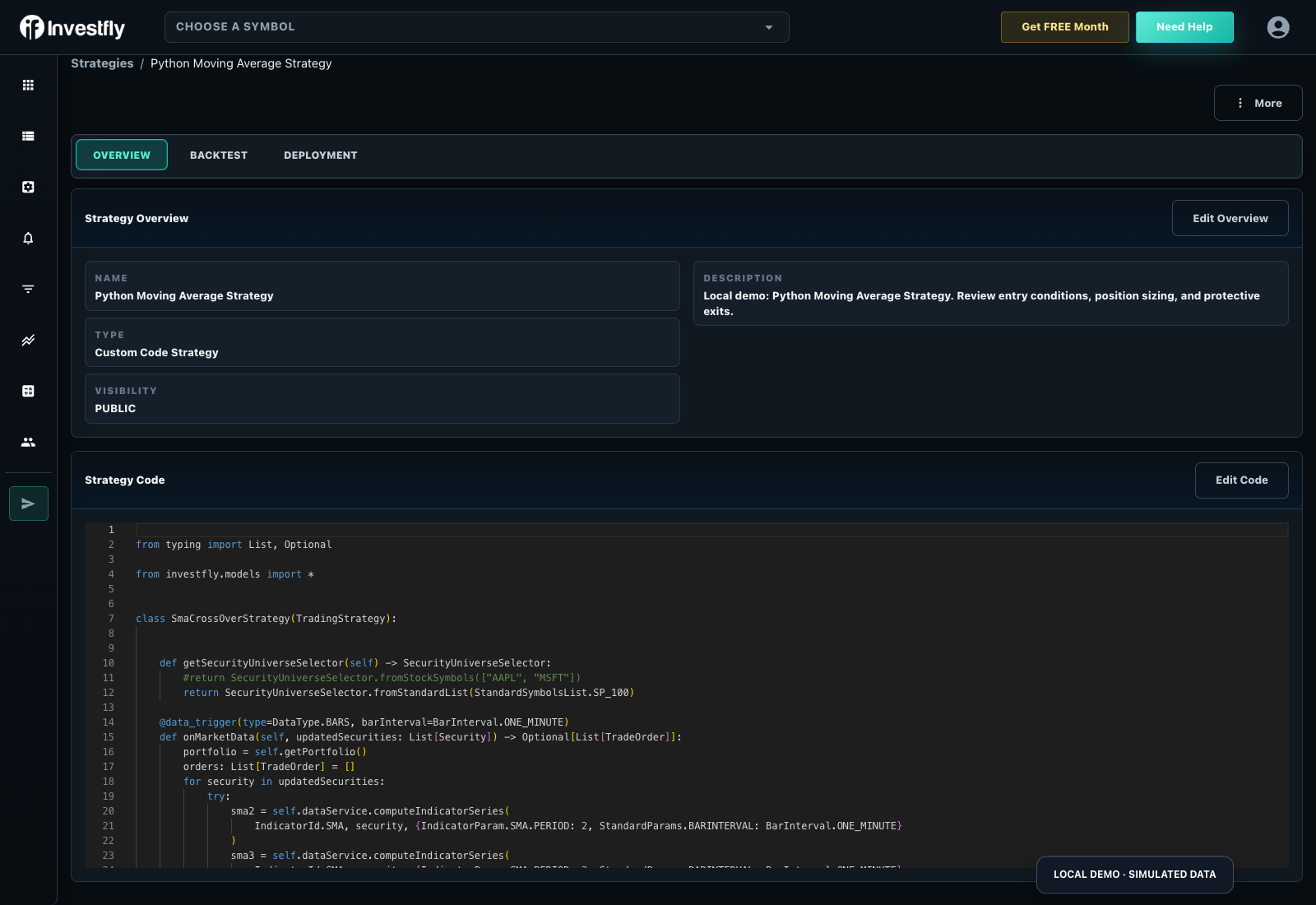
For paper deployment, open the saved strategy’s Deployment view, choose an eligible Investfly virtual portfolio and review compatibility. Observe its callbacks, positions and errors before considering live authorization. The same .py file is not a standalone backtest engine. Compare the Python product, read data/fill assumptions, and review plan limits.
A complete public Python crypto example
Download the public volatility-adaptive BTC DCA source or inspect its strategy and report. This larger maintained example demonstrates scheduled contributions and volatility-based safety orders; it is separate from MyStrategy.py and is not an investment recommendation.
| Reported period | Matched closed records | Last completed run |
|---|---|---|
| 2026-09-09 to 2026-10-13 | 2 | 2026-10-14 |
Observed October 14, 2026. Historical modeled output is not a live or paper-deployment result. Downloaded examples are type-checked locally; the platform still validates uploaded code and returns the current run’s actual status, warnings, dates and trades.
Choose an example matching the execution asset
| Asset | Complete Python source | Saved strategy |
|---|---|---|
| CRYPTO | VolatilityAdaptiveDcaGridCryptoStrategy.py | Inspect the public example |
| FOREX | ForexRsiHedgedRangeStrategy.py | Inspect the public example |
| FUTURE | MesOpeningRangeBreakoutStrategy.py | Inspect the public example |
| OPTION | AdaptiveDebitSpreadOptionStrategy.py | Inspect the public example |
Use these maintained examples with the same install/type-check/upload sequence. Forex pip/margin, futures contract/session and options policy/leg handling require their own source; changing only the stock symbol in MyStrategy.py is insufficient. Run and review the platform’s current validation/backtest before choosing a virtual deployment.
Check the paper-deployment output
After uploading, testing and choosing a compatible Investfly virtual portfolio, inspect the saved strategy’s Deployment status and Execution Logs. A deployed state establishes the running copy/account; it does not establish a filled order. Logs can show startup, evaluation, no-order decisions or errors. Reconcile orders and positions separately. See the labeled actual status/log screen and its interpretation. That fictional SMA demo is separate from MyStrategy.py; no hosted paper run of the minimal snippet is claimed here.