How to backtest an options strategy
An Investfly options strategy starts with an underlying stock or ETF signal, then selects listed contracts and materializes the configured one- or multi-leg structure. Its backtest must be read at both levels.
Before the run, review the underlying universe and signal, DTE and strike or delta selection, leg ratios, debit or credit behavior, sizing, grouped profit/loss exits, and assignment or expiration lifecycle rules.
Run the options backtest in Investfly
- Open the saved options strategy and confirm every structure, contract-selection rule, exit, and lifecycle setting on Overview.
- Open Backtest, choose a supported historical period, and start the run.
- After completion, inspect each opening package and group close alongside the portfolio curve and summary metrics.
- Repeat with other relevant periods and deliberate changes to DTE, strike selection, structure, sizing, and exits.
The general controls and interpretation sequence are explained in How to Backtest a Trading Strategy.
Inspect the structure, not just the return
| Layer | Questions |
|---|---|
| Underlying signal | Did the stock or ETF condition become eligible at the intended time and interval? |
| Contract selection | Were expiration, DTE, strike, right, delta target, and leg ratio consistent with the saved rule? |
| Package economics | Did the modeled order preserve the intended net debit or credit and whole-structure identity? |
| Group exits | Were signal, profit, loss, and time-based closes applied to the complete open group? |
| Lifecycle | Did DTE, expiration, exercise, assignment, roll, or follow-up rules move the position through the expected states? |
Evaluate options backtesting software by its assumptions
Options backtesting software needs to explain the data behind each result. Check whether option prices come from historical chain quotes or a model, how contracts are selected, and how spreads, assignment, expiration, and grouped exits are handled.
Investfly is useful for reviewing the behavior of your configured structure and underlying signal. Its synthetic or proxy prices do not establish that a historical option quote or fill was available. Review the modeled transactions, then observe the saved strategy in a compatible virtual portfolio before considering live use.
Stress the assumptions
Test multiple underlyings and market periods instead of tuning one favorable sample. Change one decision at a time. Wider modeled spreads, delayed entries, less favorable fills, and different volatility conditions can materially change an option result even when the underlying signal is unchanged.
Compare structures on consistent assumptions, and do not interpret a synthetic fill as proof that the same listed combination was available or tradable at that historical moment.
Forward-test the saved structure
After the historical review, deploy the strategy to a compatible Investfly virtual portfolio. Observe current contract availability, pending packages, group marks, lifecycle transitions, exits, and settlement behavior. Live use remains conditional on broker support for the selected instruments and atomic multi-leg behavior, account permissions, data rights, jurisdiction, and current product capabilities.
See the Investfly options trading bot and strategy builder for the supported authoring model and examples.
A complete modeled-options example
The public AAPL bull-call debit-spread example selects a 45-DTE call near 0.60 delta and a $10 width, with underlying EMA/ADX entry conditions, one contract group, net-premium group exits and an option lifecycle rule. Review every leg and rule in the linked configuration.
Inspect Options Bull Call Debit Spread, use Customize to save a private draft, and review every setting before running it.
| Reported historical period | Matched closed-trade records | Last completed run |
|---|---|---|
| 2026-09-03 to 2026-10-09 | 4 | 2026-10-10 |
Historical simulation, not live performance. Partial closes may create multiple matched records. The run uses available history; its dates can change as data refreshes. Inspect costs, fills, missing data and warnings in the full report. These settings demonstrate software behavior, not a recommended strategy.
Test sensitivity before interpreting the result
| Change one assumption | What to compare |
|---|---|
| DTE / selected strike | Entry contract, modeled mark and lifecycle timing—not just final return. |
| Spread width | Group debit/risk, buying power and close behavior. |
| Entry interval / underlying rule | Actual signals, warm-up and usable historical period. |
| Exit threshold / lifecycle rule | Which leg/group closes, elapsed DTE and realized modeled trade sequence. |
Results depend on synthetic/proxy prices and underlying bars where full historical option-chain data is unavailable. Do not interpret delta selection or group returns as reconstructed historical exchange quotes. Inspect losses, partial/group trades and warnings, and compare a forward paper-options exercise. The options automation page explains structure authoring and eligible broker execution.
A reproducible SPY iron-condor example
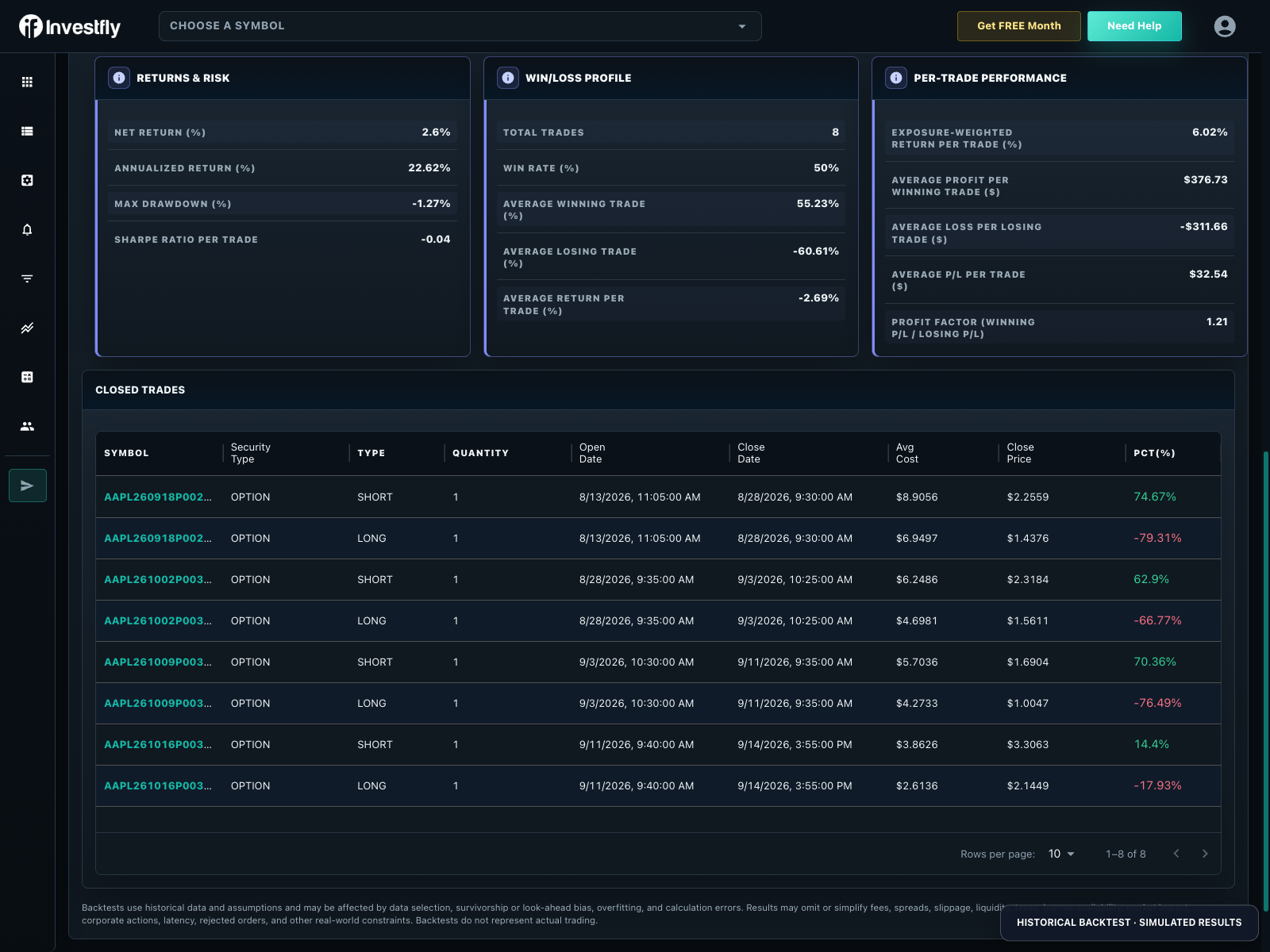
Inspect Python Iron Condor Volatility Contraction and download its full public Python source, inspected October 14, 2026. It schedules a weekly SPY iron condor for Monday 10:00: 21-DTE short legs near 0.18 target delta, $5 wings and one contract group. Fifteen-minute and hourly bars update its contraction state. Group targets/limits, delta-triggered wing rolls and a three-DTE close belong to the same definition.
| Snapshot period | Matched closed leg records | Model |
|---|---|---|
| 2026-09-10 to 2026-10-13 | 8 | Synthetic/proxy option marks; historical simulation, not historical-chain replay or live results. |
Eight matched records do not establish eight independent condor cycles. Review each leg and lifecycle action. The source defaults its readiness flag to true until a state value exists; do not assume warm-up blocks every scheduled entry. Review and test that behavior before adoption. Schedule timezone, fills, costs and missing bars affect the outcome. This short sample is a reproduction aid, not evidence of profitability. Follow the SDK tutorial to type-check and upload a private copy before a fresh modeled test or paper observation. This does not establish LEAPS or long-dated historical-chain coverage.