Turn option terminology into a complete practice trade
To practice trading stock options, use a virtual portfolio, select a specific contract, submit a simulated order, and review the recorded fill before closing the position. This exercise walks through that process for a single long call in Investfly.
You will learn how the underlying stock, expiration, strike, premium, and contract quantity fit together. The goal is to explain every order and balance change, rather than judge your skill from one winning or losing trade.
1. Set up an options practice account
Sign in, open Portfolios, and choose New Portfolio. Select the Investfly virtual account option, give it a recognizable name such as “Options practice,” and set its simulated starting cash. See creating a virtual portfolio if you need the full setup.
Write down one objective before opening the ticket: “Buy one call, verify the premium debit, then sell the same contract to close it.” Keep this first exercise to a single contract so its cash movements are easy to reconcile. These are practice instructions, not a recommendation to buy a particular option.
2. Select the exact option contract
Open Manual Trade from your virtual portfolio. In Account & Instrument, confirm the virtual account and select options. Choose an underlying stock, an expiration date, and a call contract at a listed strike. Continue to Order & Review once the selection is complete. A ticket opened with an account and instrument already selected may start at the review step.
| Contract detail | Check before continuing |
|---|---|
| Underlying | The stock the option refers to; its share price is not the option premium. |
| Expiration | The contract’s expiry date. Two otherwise similar contracts with different expirations are different instruments. |
| Call or put | A call gives its holder the right to buy shares at the strike; a put gives the right to sell them. |
| Strike | The exercise price per underlying share, not the amount you pay to buy the option. |
| Premium and size | A standard equity option usually represents 100 shares. Multiply its per-share premium by 100 and the contract quantity; adjusted contracts can differ. |
The Options Industry Council’s options basics explains these contract terms. Check the contract details rather than assuming every option has standard terms.
3. Calculate the premium before placing the order
Here is a fictional example, separate from current market quotes: XYZ stock is $100, and a $105-strike call has a $2.00 premium. Buying one standard contract costs $2.00 × 100 × 1 = $200 before fees. Buying the option does not mean buying 100 shares for $200.
Choose BUY, quantity 1, and the available order type and price controls for your exercise. A limit price defines the most you are willing to pay for that purchase; it does not guarantee a fill. Record the displayed quote and your intended price before submitting.
Review the virtual account name, full contract, action, quantity, duration, and price. Submit only after those match your written plan. The manual trade guide covers the shared ticket in more detail.
4. Check the fill and close the same contract
Look in Pending Orders and Trade History to distinguish a submitted order from a completed trade. Once filled, check Open Positions, the recorded entry price, contract quantity, and cash balance. An unrealized gain based on the current mark is not a completed sale.
For this first exercise, practice closing before expiration. Use the position’s close action or select the same contract in Manual Trade with SELL and the quantity you own. Recheck the underlying, expiration, call/put, and strike: selling a different contract does not close the original position. Confirm the exit fill and remaining quantity in the portfolio.
For the fictional $2.00 entry, these hypothetical completed exits illustrate the arithmetic. They are possible calculations, not forecasts:
| Exit premium | Sale proceeds | Gross result before fees |
|---|---|---|
| $1.00 | $100 | −$100 |
| $2.00 | $200 | $0 |
| $2.60 | $260 | +$60 |
Gross result = (recorded exit premium − recorded entry premium) × contract multiplier × contracts closed. Subtract applicable costs separately. Use completed trade prices rather than the requested limit or an earlier quote.
5. Keep a journal you can actually review
Copy this checklist into your notes for each practice trade. Keep losing trades and unfilled orders in the record: they are useful evidence about whether your instructions behaved as expected.
- Before entry: objective, virtual account, date/time, underlying price, expiration, call/put, strike, contract multiplier, and quantity.
- Order plan: displayed premium or bid/ask when available, order type, requested price, expected debit, and intended exit condition or time.
- Recorded execution: order status, entry and exit fills, timestamps, remaining quantity, and cash changes.
- Review: gross result, applicable costs, whether you followed the plan, and one mistake or unanswered question to investigate.
Repeat the exercise while changing one detail at a time, such as the expiration or order type. Do not treat different contracts as controlled comparisons when market conditions also changed. A profitable paper trade alone does not establish that a strategy will work with real capital.
Choose the next exercise
This workflow is forward paper trading: you place orders and observe what happens afterward. For historical strategy evaluation, read options backtesting and its pricing assumptions. For rules that select contracts and manage positions, explore options strategy automation.
Need the broader portfolio workflow? Start with how to paper trade, or return to Concepts and Tutorials.
Create your options practice portfolioInspect the contract and completed practice record
Options practice requires the applicable paid entitlement after the trial; a free stock-practice account does not imply unlimited free options use. Review plan access and the selected virtual portfolio before opening the ticket.
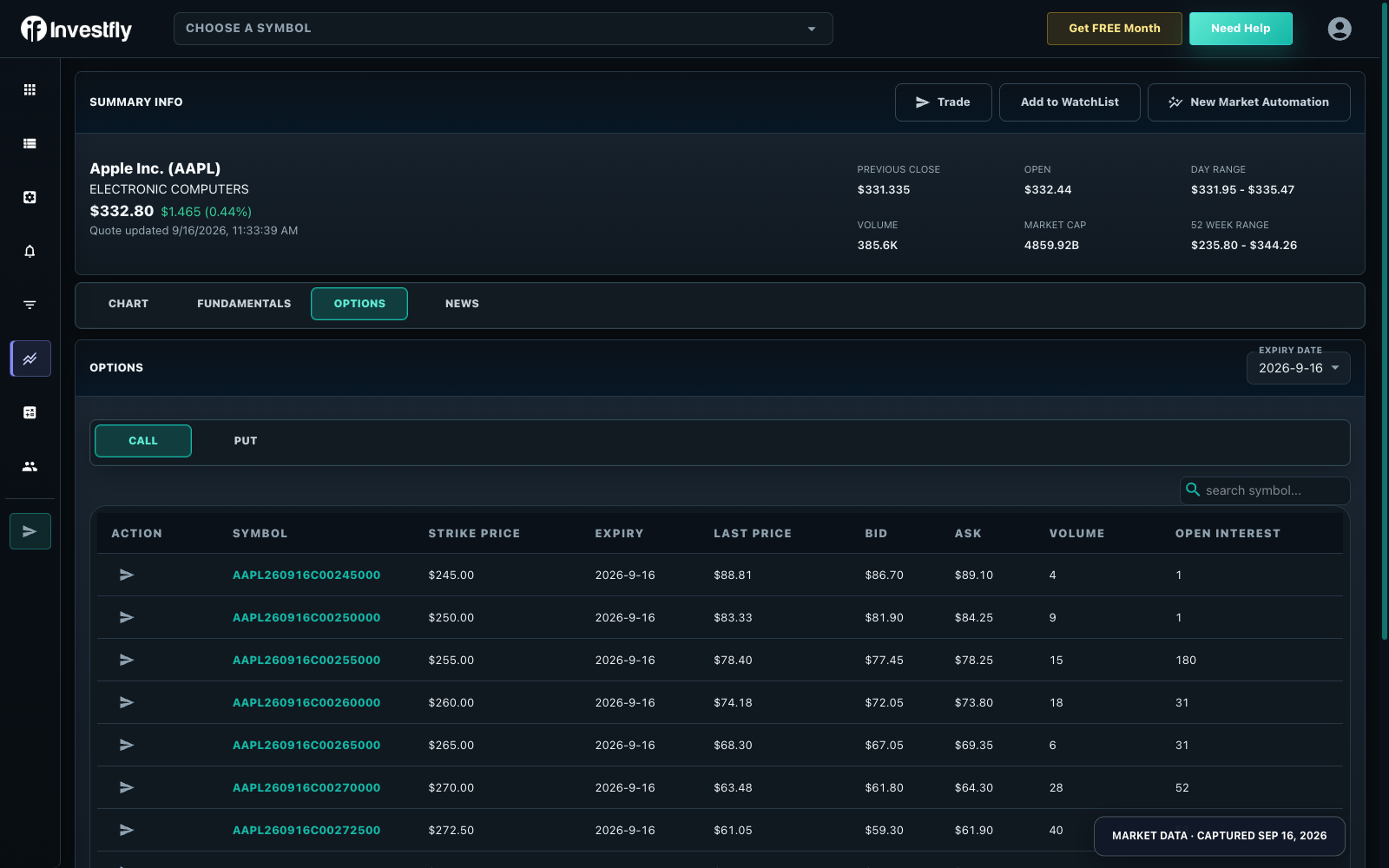
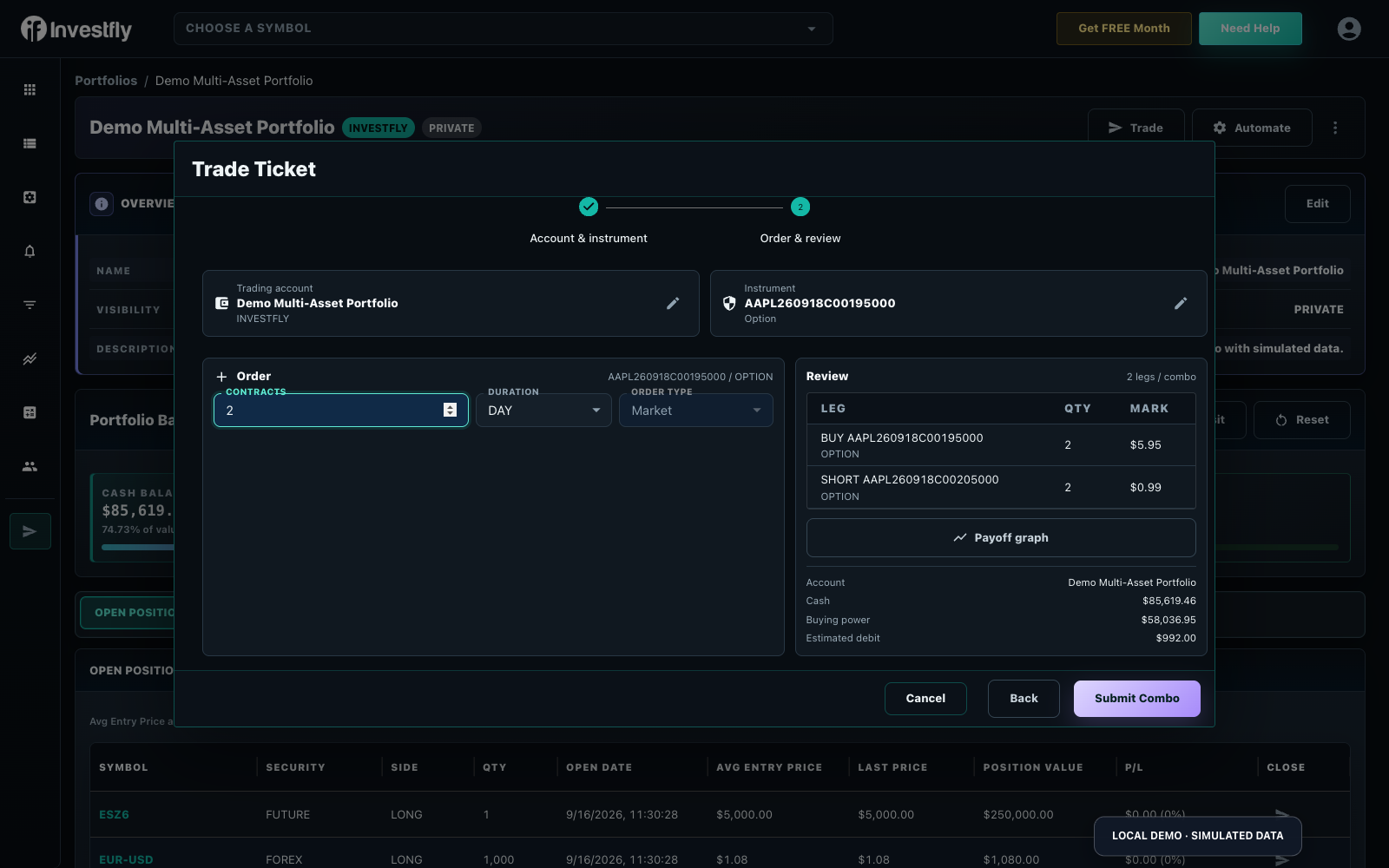
Record underlying, call/put, expiry, strike, contract multiplier, side and quantity. Pending orders are not completed trades. After closing, reconcile matched entry/exit facts and any partial closes; do not use a stock share formula without accounting for contract units. The screenshots show fictional data, not current quotes.
Compare automated structure management with modeled historical testing; forward paper practice and synthetic backtests answer different questions.
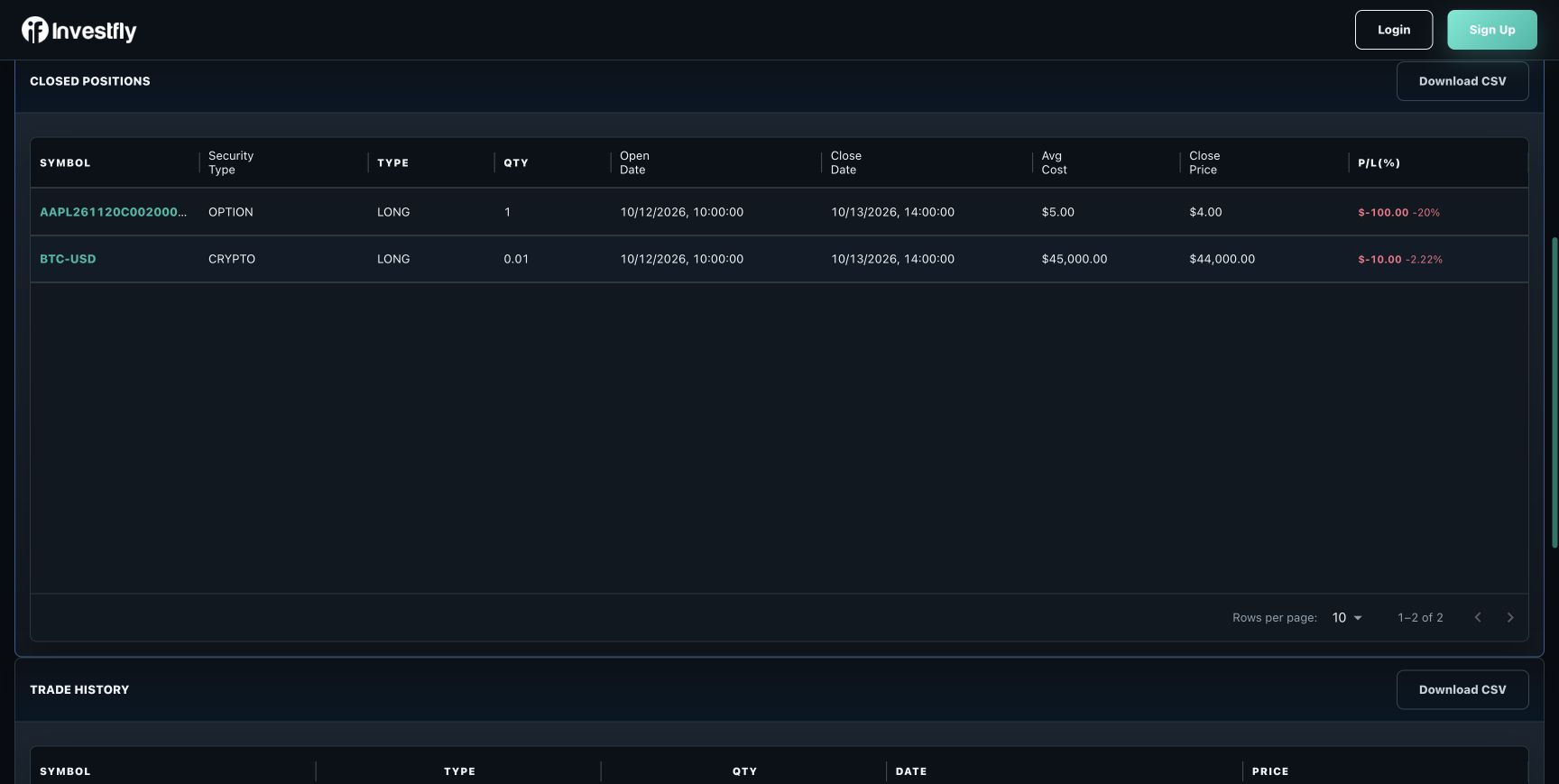
In a forward paper portfolio, open Trade History after a close to inspect matched records. A submitted order is not a closed trade; partial fills and closes can create more than one record.
Read the completed option record
In the fictional row, AAPL261120C00200000 identifies the AAPL call expiring November 20, 2026 at a $200 strike. One long contract opens at $5 and closes at $4. With a 100-share multiplier, the price-only result is (4 − 5) × 100 × 1 = −$100 (−20%), before any separate fees. A spread must be reconciled across its legs; this single-contract illustration is not the two-contract combo ticket shown earlier. The seeded records demonstrate the UI’s units and fields, not a successful execution test.