Start with a paper trading account
Investfly paper trading uses a virtual portfolio with simulated cash, orders, positions, and performance. You choose the instruments and rules; the simulator records how those instructions behave with current data and modeled execution.
1. Create a virtual portfolio
- Sign in, open Portfolios, and choose New Portfolio.
- Select the Investfly virtual account option, name the portfolio, and enter its starting simulated cash.
- Save the portfolio and open it from the portfolio list.
Use separate virtual portfolios when you want independent balances and histories for different ideas. The number you can retain depends on your current membership plan.
2. Place a paper trade
- From the virtual portfolio, chart, symbol page, or supported result list, open Manual Trade.
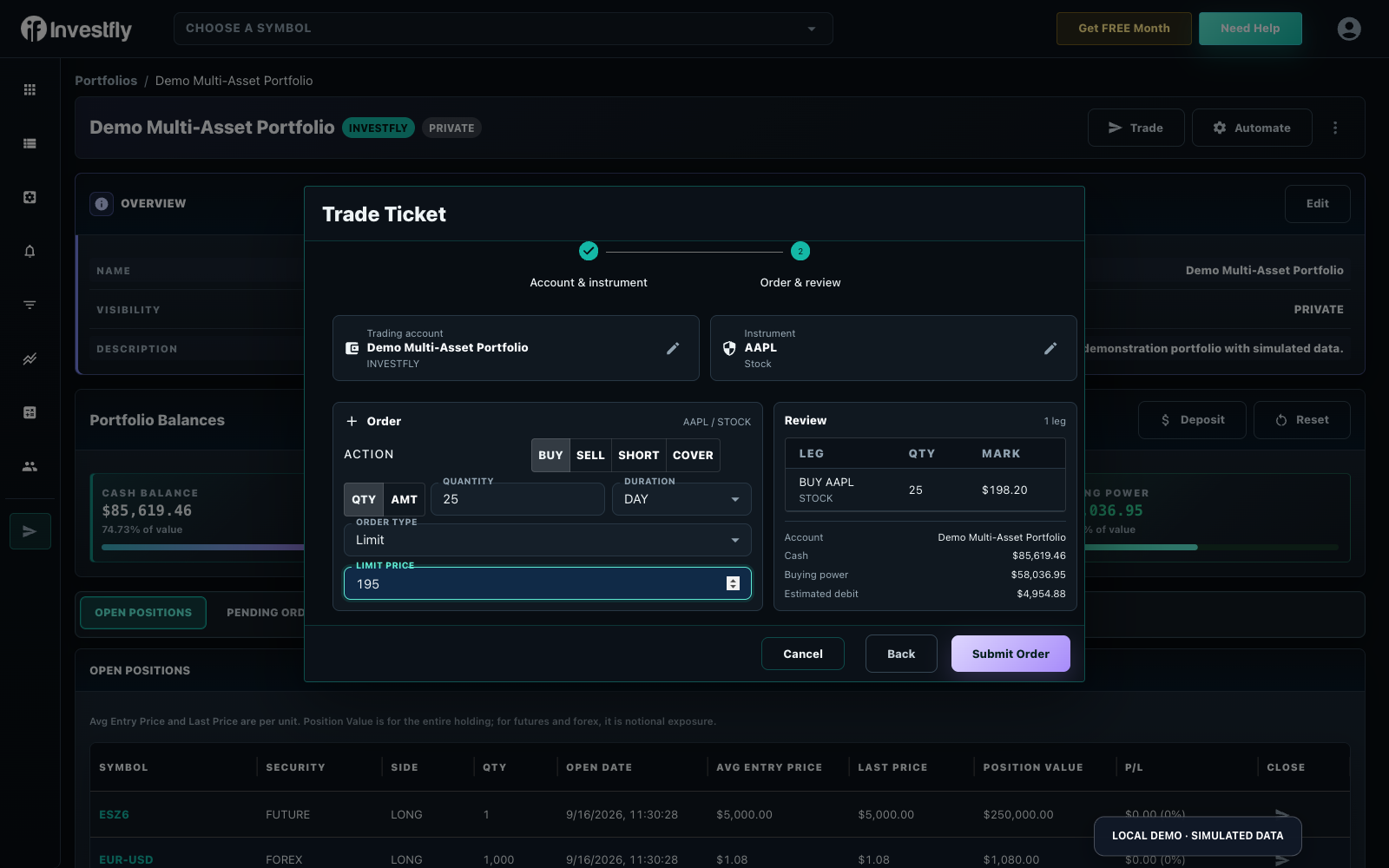
- Select the portfolio and instrument. The ticket adapts to stocks and ETFs, crypto pairs, forex pairs, futures contracts, or options where supported.
- Choose an available action, size, order type, duration, and price controls.
- Review the complete order preview, then submit it to the virtual portfolio.
Market orders prioritize execution rather than price. Limit, stop, or OCO instructions may remain pending until their conditions are modeled as met. See the focused manual trade guide for the asset-aware ticket.
3. Read the result
| Portfolio area | What to check |
|---|---|
| Balances | Simulated cash, buying power, margin, and current portfolio value. |
| Open Positions | Quantity, average entry, current mark, exposure, and unrealized change. |
| Pending Orders | Orders waiting for a modeled trigger or fill; cancel or edit only when the control is available. |
| Trade History | Submitted and completed activity, including the actual recorded price and status. |
| Performance | The path of account results and trade analytics, interpreted alongside deposits and resets. |
4. Add automation only when the manual mechanics are clear
A Market Automation can watch one condition and notify, submit one configured order, or do both. A Trading Strategy coordinates a fuller lifecycle with entries, scaling, exits, schedules, and portfolio limits. Deploy either to a compatible virtual portfolio before considering an eligible connected account.
Monitor the portfolio’s Automation, Pending Orders, Positions, and Trade History views together. A rule can evaluate correctly while an order remains pending, is rejected by a guard, or behaves differently from your expectation.
Try a spot crypto practice exercise
Ready to apply the workflow to cryptocurrency pairs? Follow how to paper trade crypto for a spot-only plan, one simulated round-trip, and a review checklist that stays clear of perpetuals.
Try an options practice exercise
Ready to apply the workflow to a specific contract? Follow our practice trading stock options tutorial to select a call, calculate the premium, place and close a simulated order, and record the result in a journal.
Keep a practice trading journal
Want a repeatable review habit across any market? Follow how to keep a trading journal to use Trade History, export CSV, and write a short post-trade checklist.
Use a repeatable practice loop
- Write down the decision and expected order before submitting it.
- Place a small simulated trade and inspect each status change.
- Compare the resulting position and balance with your expectation.
- Test exits, pending orders, and another market condition.
- Reset only after saving any evidence you want to keep; reset removes the simulation’s accumulated activity.
For a broader beginner path, visit the Investfly paper trading simulator for beginners.
Your first stock order and its states
Standard includes one stock/ETF virtual portfolio after the trial. Premium/Elite add paid testing and automation; supported additional markets have their own limits. Check plan access before practicing a different asset.
| State | What you should see | What it means |
|---|---|---|
| Pending | Order in Pending Orders; no corresponding filled position yet | The modeled condition has not filled the request. |
| Filled/open | Position quantity and basis in Open Positions; completed activity in history | The simulator modeled execution; the result may differ from broker fills. |
| Closed/matched | Closed trade with entry/exit facts and modeled P/L | You can reconcile and journal the completed round-trip. |
For an illustrative $10,000 virtual account, a request for ten shares at a $100 limit is a $1,000 notional request before modeled costs. It does not guarantee a fill at that price. Inspect current data, quantity, account and order preview before submitting. This is a fictional arithmetic example.
Use the cash/positions explanation, the simulator overview and the journal worksheet.