Market Automations
A Market Automation watches a security universe and runs the actions you choose when its entry condition becomes true.
Use the same guided builder for a notification-only alert, an automated trade, or both. The New Alert and New Trading Bot buttons are convenient presets for this single automation model.
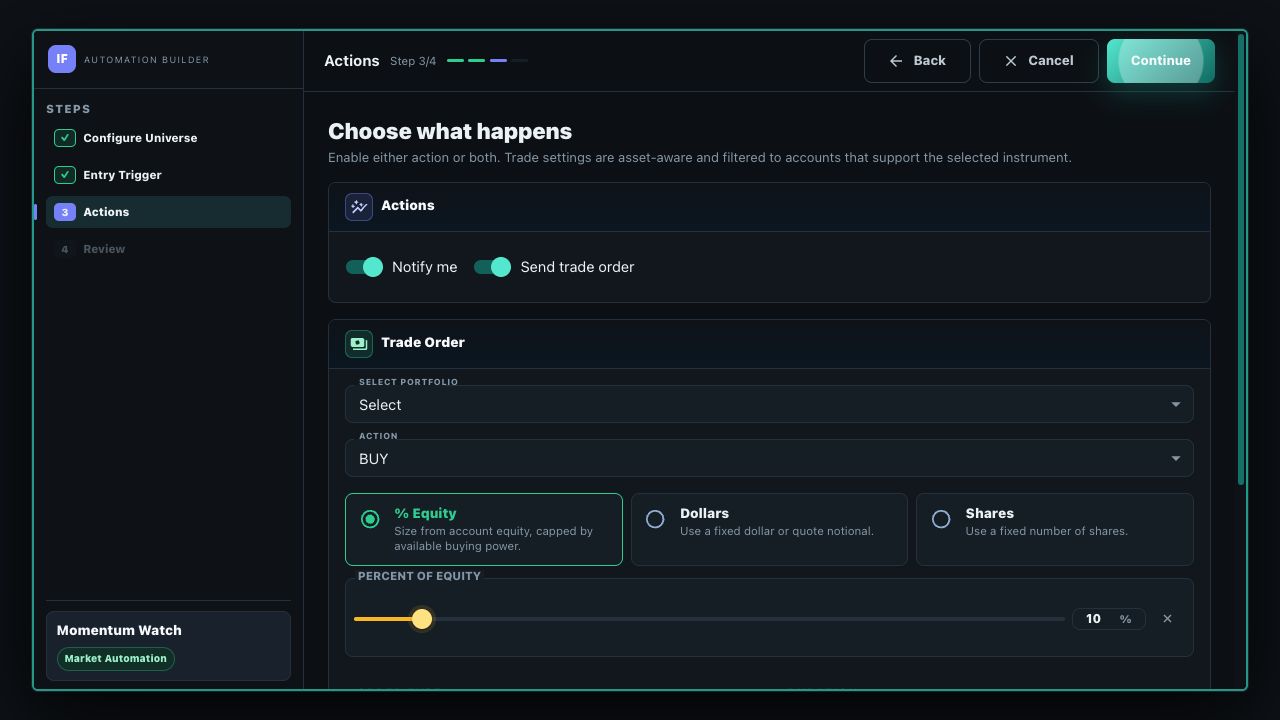
Choose the Actions
Notify Me
Receive one notification containing the securities that newly matched the entry condition.
Send Trade Order
Submit the configured, asset-aware order through the selected compatible portfolio. Account, direction, sizing, order type, and duration controls appear when this action is enabled.
Create a Market Automation
- Configure Universe: name the automation, choose Equity, Crypto, Forex, Futures, or Options, and select a standard list, custom symbols, a watch list, or a supported fundamental query. Option triggers evaluate the underlying equity universe; the action then selects contracts.
- Entry Trigger: start from a template or build a price, market-data, or indicator expression. Conditions can be combined with AND and OR groups.
- Actions: select Notify me, Send trade order, or both. Trade controls adapt to the selected asset and only show compatible accounts and choices.
- Review: confirm the resolved universe, trigger, actions, repeat policy, and optional limits before creation.
Every security in the resolved universe is evaluated independently. If several securities newly match in one evaluation, one notification contains the full matching set. A trade-enabled automation chooses the alphabetically first eligible match for the order and records the skipped matches in history.
Run Once or Repeat After Re-arm
An automation fires on a false-to-true transition for each security, not on every evaluation while the condition remains true.
- Complete after the first occurrence: the automation becomes completed after its first accepted trigger occurrence.
- Wait for the condition to re-arm: after a security fires, its condition must evaluate false at least once. A later false-to-true transition can create another occurrence. A continuously true condition does not fire repeatedly. Trade-enabled automations also require a maximum occurrence count of at least two.
This lifecycle applies to both actions. A repeatable notify-only automation can notify again after re-arm; a repeatable trade automation can submit another order after re-arm until its configured limit is reached.
Manage and Review Results
The dashboard's Market Automations section shows each automation's actions, universe, repeat policy, status, latest matching security, occurrence count, and resulting order. Status moves through states such as Inactive, Active, Executing, Completed, Failed, Cancelled, or Expired.
You can activate, deactivate, edit, or delete an automation and inspect its occurrence history. When you change evaluation or action settings, review the updated configuration and activate it when you are ready for monitoring to resume.
Use a full Trading Strategy when you need an end-to-end system with entry and exit rules, risk controls, position management, or option lifecycle management.