Trade from a result list
A screener or watch list can preselect several symbols for one reviewed manual-trade workflow.
This action creates immediate order requests from the selected rows. It does not save a reusable order template, schedule future trades, or keep monitoring the list.
Submit a multi-security trade
- Open a screener result or supported watch-list view.
- Select only the rows you intend to include.
- Choose the trade action to open the multi-security ticket.
- Select the portfolio and configure the supported action, sizing method, order type, and duration.
- Review every symbol and calculated order before submitting.
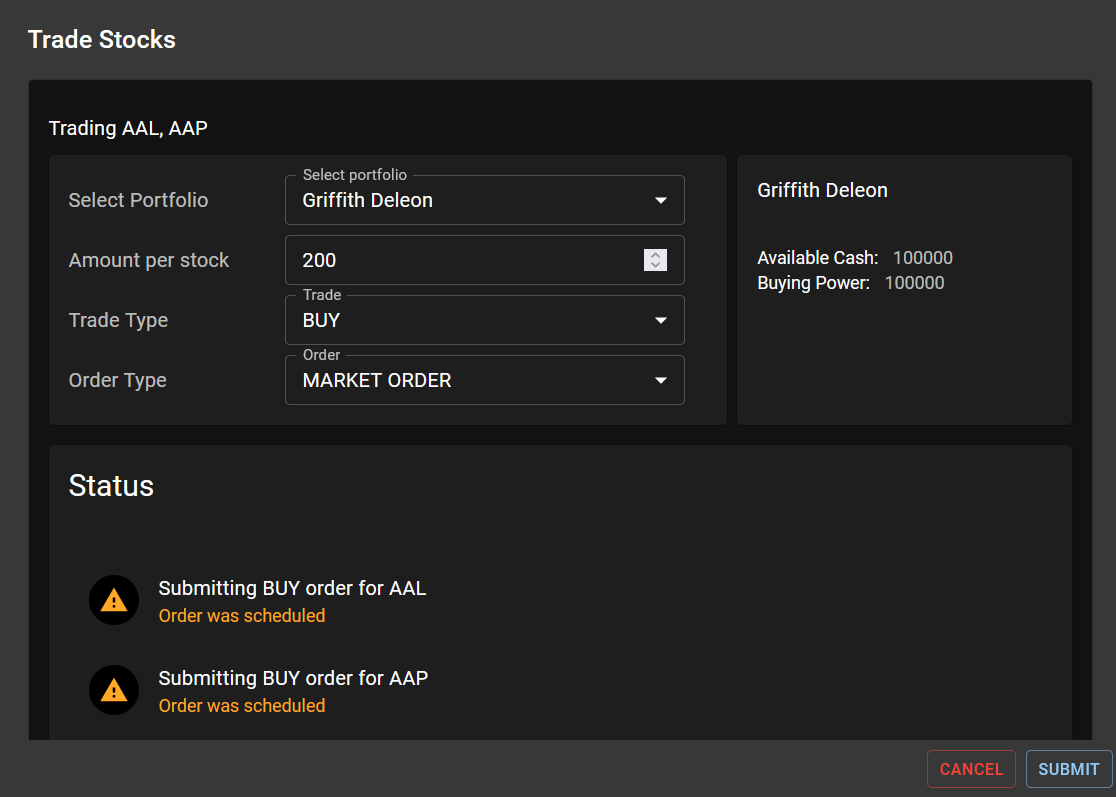
How batch submission behaves
Each symbol is still validated as its own order. A provider can accept one order and reject another because of buying power, symbol eligibility, position state, or market rules. Check Pending Orders and Trade History after submission rather than assuming the batch had one shared outcome.
Selection is not allocation advice. The list supplies symbols, but you remain responsible for the portfolio, direction, sizing, concentration, and order settings.
When to use another tool
- For one symbol or an option/futures contract, use the standard Manual Trade ticket.
- For future false-to-true monitoring, create a Market Automation.
- For recurring entries, rebalances, exits, or portfolio limits, create a Trading Strategy.