How to create a stock screener for swing trading
Compare filter capabilities, plan limits and research examples on the stock screener product page, then follow the setup steps below.
A screener answers a point-in-time research question: which securities in this universe satisfy these conditions now?
For a feature overview, filter examples, and available workflows, explore the Investfly stock screener.
Screeners do not keep false/true state and do not schedule notifications. When you need a condition to be monitored for a new match, use a Market Automation.
Configure and run your stock screener
- Open Screeners and choose a template or create a new screener.
- Select an equity/ETF universe such as a standard list, sector, or custom symbols.
- Build the criteria from supported price, quote, financial, standard-indicator, or custom-indicator inputs.
- Run the screener and inspect the matching rows. Save it if you want to reuse the definition.
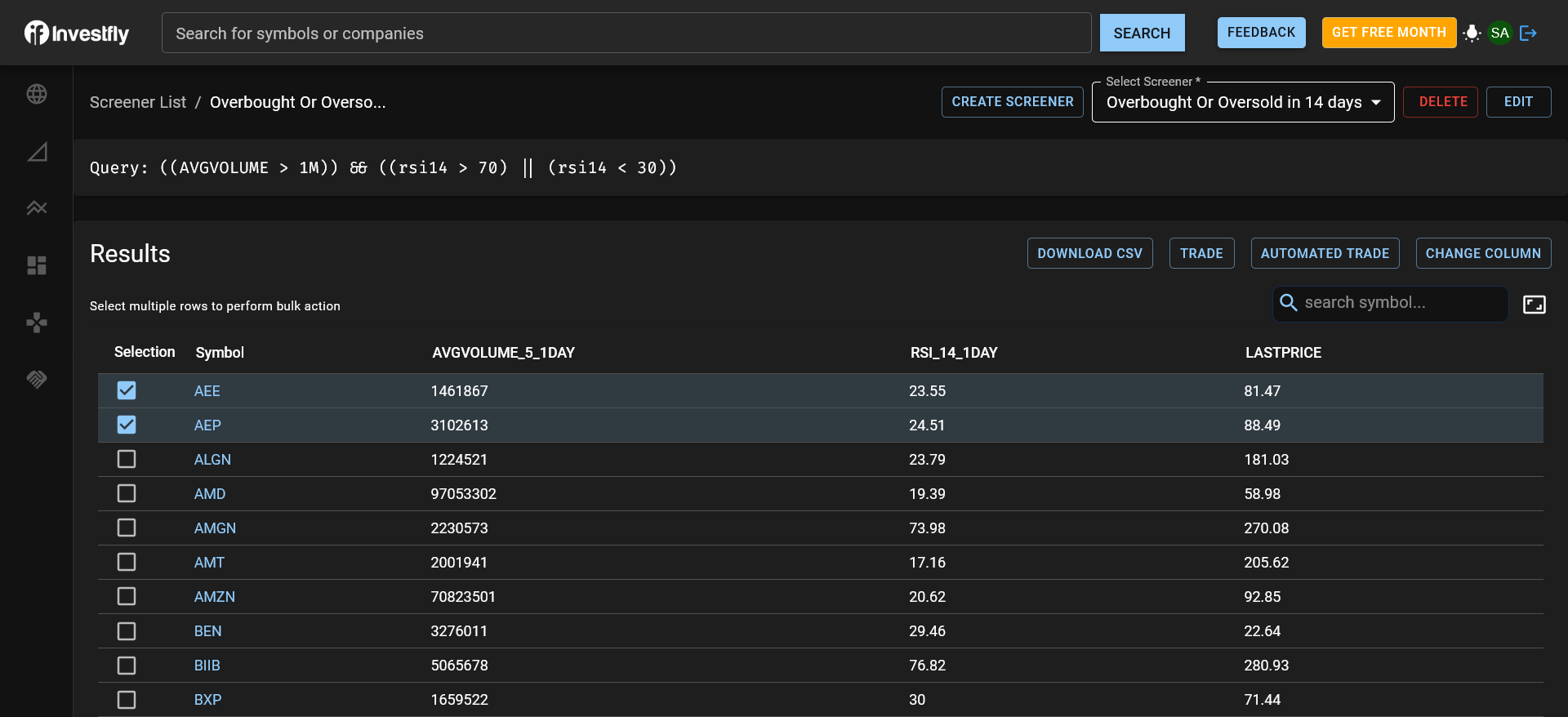
Example: build a swing-trading research shortlist
A stock screener for swing trading can narrow a daily research universe before you inspect individual charts. This example shows how to express a research question; it is not a recommended trading strategy.
- Choose a stock or ETF universe you want to study.
- Use daily price bars for the indicator inputs. For example, compare the closing price with a 20-period simple moving average to identify symbols above their recent average.
- Add a supported volume condition with a threshold you choose, and combine it with the price condition using AND. Keep the interval consistent across inputs.
- Run the scan and inspect each matching chart. Compare price history and volume, and record why a symbol belongs on your research shortlist.
- Add selected symbols to a stock watchlist. Save the screener and rerun the same definition when you next review the market.
The 20-period average is an illustrative input, not an optimized setting. A match is a current data condition, not an entry signal or a forecast. See technical indicators and Expression Builder to understand the available inputs and logic.
Investfly's stock screener software keeps the saved criteria separate from a trading strategy. Use Market Automation when you need ongoing condition monitoring, or test an explicit entry, sizing, and exit plan with the stock trading bot workflow.
Example: screen for a pullback within an uptrend
Swing traders often look for symbols that are still in a longer trend but have pulled back for a few sessions. You can express that research question with daily conditions:
- Set the indicator inputs to daily bars.
- Add a trend condition: the closing price is above its 50-period simple moving average.
- Add a pullback condition with AND: the 14-period RSI is below a level you choose, such as 40.
- Add a volume condition with AND so the shortlist only includes symbols with the trading activity you require.
- Run the scan, add RSI and moving-average columns to the results, and review each chart before a symbol goes on your watchlist.
The 50-period average and the RSI level of 40 are illustrative inputs, not recommended settings. Clone the screener to compare a different RSI level or average length while keeping the original definition.
What to check in a swing trading screener
Swing research usually runs on daily bars and is reviewed once per session, so the screener matters less for speed and more for how well it expresses and repeats your conditions. Before you rely on any screener, check that it lets you:
- Combine trend, momentum, and volume conditions. Investfly combines price, quote volume, company fundamentals, and supported indicators such as moving averages, RSI, and MACD with AND/OR logic in the Expression Builder.
- Choose the bar interval. Use daily bars for multi-day setups, or supported shorter intervals when you also study intraday entries. The screener is not a high-frequency scanner, and data coverage and update timing vary by symbol and source.
- Save and rerun the same definition. A saved screener keeps the universe and conditions so each daily review uses the same rules. The free Standard plan includes one saved screener; paid plans raise that limit, as listed on the pricing page.
- Move matches into a shortlist. Add selected symbols to a watchlist to follow them over the days the swing setup may take to develop.
- Watch for a new match. A screener evaluates the data when it runs. Use Market Automation when you want to be notified that a condition has become true.
- Test rules before you trade them. A screen describes a condition, not a trade plan. Turn explicit entry, sizing, and exit rules into a strategy and backtest it on historical data before you use it.
Understand the results
A result means the available data made the expression true during that run. It does not predict a price move and is not an investment recommendation. Inputs can update at different frequencies, so review both the condition and the data interval.
Saved results can refresh while the results view is open. Use filters to narrow the grid and add supported indicator columns to compare the current matches.
Work with matching securities
- Open a symbol's chart or detail view.
- Add selected symbols to a watch list.
- Add indicator columns to the results.
- Export the available grid data from the desktop workflow.
- Select rows and open the multi-security trade workflow.
- Use a screener definition as the starting universe for a strategy where the product offers that action.
Manage saved screeners
From the Screener list you can run, edit, clone, or delete a saved definition, subject to your plan's resource limit. Cloning is useful when two research questions share a universe but need different conditions.
See Expression Builder for AND/OR logic, Indicators for indicator inputs, or the stock trading bot platform for the complete stock research and automation workflow.